Scheduled tasks, or Crontab jobs, are managed by the cron service on Linux. They allow users to create and manage tasks that run commands or scripts automatically at specific time points or intervals. Crontab is short for cron table. Cron is a background process in Unix-like systems for running scheduled jobs. A crontab file contains a series of scheduled task entries, and each entry defines when a task should run and which command or script should be executed. These tasks can be scheduled by minute, hour, day, month, weekday, and other time units.
1. Start editing scheduled tasks:
Bash
# Enter edit mode; editing behaves like vi
crontab -e
2. Crontab syntax
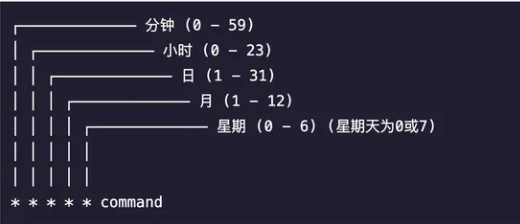
Scheduling examples:
Bash
# Run once every minute
*/1 * * * * or * * * * *
# Run once every hour
0 * * * * or 0 */1 * * *
# Run every day at 7:10 AM
10 7 * * *
# Run once every week
0 0 * * 0
# Run once every month
0 0 1 * *
# Run once every year
0 0 1 1 *
# Run at the 5th minute of every hour
5 * * * *
# Run every Sunday at 6:30
30 6 * * 0
# Run at 7:30 on the 8th day of every month
30 7 8 * *
# Run at 3:30 on the 10th and 20th day of every month
30 3 10,20 * *
# Run every 15 minutes
*/15 * * * *
# Run at 6:30 every 10 days within each month
30 6 */10 * *